Read and Count | Free app to learn to read and write
Learn to read and write at home with Read and Count.
[botao1]A free adult literacy app with simple lessons on letters, syllables, numbers, shapes, and more.
Start today on your phone and study at your own pace.
What is Read and Count?
Read and Count is like having a patient teacher right in your pocket. It’s designed for anyone who’s ready to take that first step into reading and writing—whether you’re 8 or 80.
The app guides you gently through letters, sounds, words, and numbers. There’s no pressure, no judgment. Just you and your phone, moving forward at whatever speed feels right.
While it was originally created with kids in mind, adults and seniors have discovered it’s perfect for them too. The interface is clear, the lessons are bite-sized, and everything happens at your own pace in the privacy of your home.
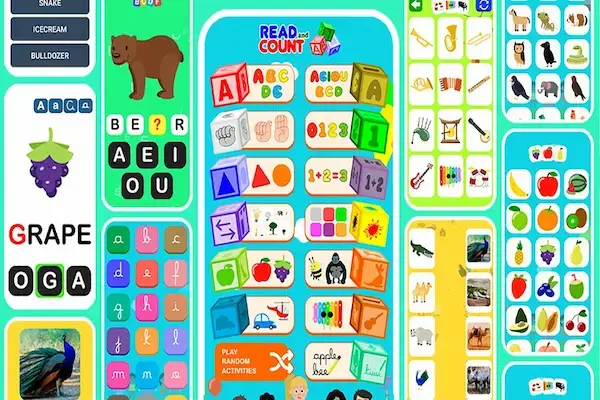
Inside, you’ll explore the alphabet, vowels and consonants, syllables, numbers, shapes, colors, and even some sign language basics. There’s a library of over 200 words waiting for you to practice with. These aren’t just random words—they’re carefully chosen to help you build confidence day by day.
Why Read and Count works for adults and seniors
Here’s the truth: it’s never too late to learn. Not at 40, not at 60, not at 85.
This app understands that. The buttons are large and easy to tap. The images are clear. Every lesson is short enough that you can fit it into a busy day—or repeat it until it clicks.
There’s no need to commute to a classroom or sit in a circle with strangers if that feels uncomfortable. Your living room becomes your school. Your coffee break becomes study time. And if you’d like company, invite a friend or family member to learn alongside you.
The beauty of Read and Count is that it never rushes you. Repeat a lesson ten times if you need to. The app will wait. Your brain will remember. Your confidence will grow.
Who can use Read and Count
This app is for anyone who’s ever thought, “I wish I could read better.”
Maybe you’re an adult who never had the chance to finish school. Start here with the alphabet, and watch how quickly the letters start to make sense.
Perhaps you’re a senior who wants to refresh what you once knew. The basics are all here, waiting to welcome you back.
If you’re a parent or caregiver, you can share this tool with someone you love. It’s a gift that opens doors.
And if you’re a teacher or volunteer, this app works beautifully in community programs. It’s part of Google Play’s “Teacher Approved” family section, which means it meets high standards for educational content.
Main features of Read and Count
Here’s what you’ll find inside Read and Count—each feature designed with care to help you grow:
- Alphabet A–Z with colorful illustrations so you learn both the look and sound of each letter
- Vowels and consonants to help you understand how letters work together
- Syllables that teach you to connect letters and form your first words
- Numbers up to 100 with counting exercises, plus simple addition and subtraction
- Colors, shapes, animals, fruits, musical instruments, and more—each with pictures to help new words stick
- Flags and transport icons to keep things interesting and fun
- Sign language basics to show you a whole new way of seeing letters
- Over 200 words you can read, hear, and practice in real contexts
These sections take you from knowing individual letters to reading full words and short sentences. And they do it in a way that feels playful instead of stressful.
Download and cost information
Read and Count is ready and waiting for you on Android. Just search for it on Google Play under “Apps Bergman.”
The app is free to download and use, though you’ll see some ads as you go. There are also optional in-app purchases if you want to unlock extra features later.
If you’re an iPhone or iPad user, look for “Ler e Contar” in the App Store.
With over 5 million downloads and a 4.4-star rating on Google Play, it’s clear this app has helped countless people. The “Teacher Approved” badge is another sign that real educators trust it.
Remember, ratings and prices can change, so check your device’s app store for the latest details.
Is this a free adult literacy app?
Yes, absolutely. You can begin learning today without paying a cent.
Ads will pop up occasionally—that’s how the app stays free. But they’re not overwhelming. And if you find the app helpful, you can explore paid options later to remove ads or unlock more content.
Many adults have chosen Read and Count as their first step precisely because it’s free and accessible.
How to use Read and Count at home
Getting started is easier than you think. Here’s a simple guide:
- Open your phone’s app store and search for “Read and Count” by Apps Bergman
- Tap “Install” and give it a moment to download
- Open the app and take a look around the main screen—everything is clearly labeled
- Start with the Alphabet and try the first letter
- Trace the letter with your finger if the activity asks you to
- Say the letter out loud—this trains both your memory and your mouth
- Tap on word examples and repeat them
- Move to vowels and consonants to see how they’re different
- Try syllables to connect sounds and build simple words
- On another day, explore Numbers—count from 1 to 10, then 20, then beyond
- Practice addition and subtraction when you feel ready
- Dive into Colors, Shapes, and Animals to expand your vocabulary
- Keep a small notebook where you write new letters and words each day
- Read your notes out loud to reinforce what you’ve learned
This routine will guide you through the app in a natural, friendly order. Feel free to adjust it based on your schedule and energy.
Read and Count for families and helpers
If you’re supporting someone else’s learning journey, here’s how to make it smoother:
- Use a phone with a larger screen if possible—it makes a world of difference
- Turn up the volume or use headphones to help them focus
- Sit together for 10–15 minutes per session—no more, no less
- Celebrate every small win and repeat difficult parts without pressure
- Help with tapping and swiping if they’re new to smartphones
- Read words aloud first, then invite them to repeat after you
- Let them control the pace—this is their journey, not yours
- Celebrate progress each week with a small reward, like a favorite snack or a walk together
Your kindness and patience can make all the difference.
Read and Count | Learn from home with confidence
The best part? You don’t have to go anywhere.
No commute. No fixed class schedule. You can practice in the morning with your coffee, during lunch break, or before bed.
Many sections work offline, though some features may need an internet connection. To save mobile data, connect to Wi-Fi when downloading or updating the app.
Find a quiet corner, keep your phone charged, and give yourself this gift of time.
Read and Count | Best app to learn reading and writing for beginners
There are plenty of apps out there, but Read and Count stands out because it doesn’t try to do too much.
It focuses on the essentials:
- The alphabet
- Syllables
- Numbers
- Colors and shapes
This simplicity is perfect for adult beginners who just want a calm, clear starting point.
It’s not a full grammar course, and that’s okay. You’re building a foundation first. Later, you can move to longer texts, stories, and more complex writing.
If you need a “first step” app, this is it.
A friendly 30-day plan to learn with Read and Count
Here’s a plan to help you build momentum. Feel free to adjust the pace to fit your life.
Week 1 — Letters and sounds
- Day 1: Learn letters A to E, repeat each three times
- Day 2: Learn letters F to J, repeat each three times
- Day 3: Learn letters K to O, repeat each three times
- Day 4: Learn letters P to T, repeat each three times
- Day 5: Learn letters U to Z, repeat each three times
- Day 6: Review all letters using the app’s activities
- Day 7: Write each letter in your notebook and read them aloud
Week 2 — Vowels, consonants, and syllables
- Day 8: Focus on vowels—A, E, I, O, U—and their sounds
- Day 9: Focus on consonants and how they pair with vowels
- Day 10: Join letters to form simple syllables like BA, BE, BI, BO, BU
- Day 11: Build short words from syllables, like BO-LA or CA-SA
- Day 12: Repeat and read these words out loud, three times each
- Day 13: Explore the app’s 200+ word list and pick five favorites
- Day 14: Write five sentences using your new words
Week 3 — Numbers and daily words
- Day 15: Count from 1 to 20 with the app
- Day 16: Count from 21 to 50 and practice writing the numbers
- Day 17: Count from 51 to 100 and review
- Day 18: Practice simple addition with small numbers
- Day 19: Practice simple subtraction
- Day 20: Learn colors and shapes, write them in your notebook
- Day 21: Learn animal names and match them with pictures
Week 4 — Everyday practice and confidence
- Day 22: Read fruit names and write down your favorites
- Day 23: Learn names of musical instruments or types of transport
- Day 24: Try the sign language section to see letters in a new way
- Day 25: Read 10 words and use each one in a short sentence
- Day 26: Copy a label from home—like a cereal box—and read it out loud
- Day 27: Send a text message using three new words you’ve learned
- Day 28: Read a short note or recipe and underline key words
- Day 29: Write a short note to a family member and read it aloud
- Day 30: Review your notebook and celebrate how far you’ve come
Each day is a small victory. String them together, and you’ll be amazed at what you’ve accomplished.
Tips to succeed with a free adult literacy app
- Start small—10 to 15 minutes a day is plenty at first
- Pick a consistent time you can stick to, like after breakfast or before bed
- Use earphones to help you focus and hear every sound clearly
- Repeat lessons for two or three days if they feel challenging
- Study with someone once a week—a family member or friend
- Keep a notebook and write new words every day
- Put sticky notes on objects at home with their names
- Read signs and menus when you’re out to practice in real life
- Be patient with yourself—progress isn’t always linear, and that’s okay
Safety, privacy, and ads
Read and Count is part of Google Play’s family section and carries the “Teacher Approved” badge, meaning it’s been reviewed for quality educational content.
The app is free, but it does show ads between activities. There are also optional purchases available if you want to remove ads or unlock extras.
For privacy details and updates, check the store page. And if you share a device with children, set a PIN for purchases in your app store settings to avoid accidental charges.
Read and Count vs other tools
There are many apps and tools for learning to read and write. Some are packed with features and complex menus that can feel overwhelming.
Read and Count is different. It’s simple, visual, and direct. It helps you build a strong foundation before you move on to more advanced material.
Think of it as your starting point. Once you’re comfortable with letters, words, and basic sentences, you can layer on books, audiobooks, or local classes.
Your learning path might look like this: app first, then app plus real-life practice.
Common questions about Read and Count
Is Read and Count only for children?
Not at all. Adults and seniors use it successfully every day. The topics are basic, which makes them perfect for any beginner.
Do I need the internet to study?
You’ll need internet to download and update the app. Some activities work offline, but others may require a connection. Use Wi-Fi whenever possible to save your mobile data.
Does Read and Count cost money?
The app is free to use. It contains ads and offers optional purchases, but you can learn everything you need without spending a cent.
Which devices can I use?
Read and Count works on Android phones and tablets. iPhone and iPad users can find the app under the name “Ler e Contar” in the App Store.
Is Read and Count safe?
Yes. The “Teacher Approved” badge on Google Play is a strong indicator of quality and safety for family use. Always check the current store page and your device settings for the latest information.
Final word and next step
If you’ve been waiting for the right moment to learn, this is it.
Open your app store right now. Search for Read and Count. Install it. And do just one short lesson today.
Write three new words in a notebook. Say them out loud.
That’s all. Just start.
Because small steps, taken consistently, become something beautiful. You can read. You can write. And you can begin right now.
Important: This content is independent and has no affiliation, sponsorship, or control from any app, company, institution, or third party mentioned.