Discover how to qualify for a free government smartphone with Lifeline,
including eligibility, documents, providers, and application steps.
For many households in the United States, staying connected can make a real difference when it comes to job calls, medical appointments, school communication, family contact, and emergencies. That is why many people search for a “free government smartphone.”
In practice, the federal government does not hand out phones directly.
Lifeline is a federal benefit that lowers the monthly cost of eligible phone or internet service, and some participating companies may choose to include a smartphone with their Lifeline-supported plans.
This guide explains how a smartphone with Lifeline works, who may qualify, how the official process works, and where to verify current details safely.
Notice: this content is independent and has no affiliation, sponsorship, endorsement, or control from any government entity, provider, carrier, or platform mentioned here.
All information is for general educational purposes only, and you should confirm current rules, eligibility, and service details through official Lifeline resources and directly with the participating company you choose.
Official resources:
- Check official Lifeline eligibility
- See the official Lifeline application steps
- Find participating Lifeline companies near you
- Review the official documents guide
- Learn how annual recertification works
What Is a Smartphone with Lifeline?
The first important point is that there is no federal office where you simply walk in and pick up a free phone.
The Lifeline program is a long-running federal benefit that helps eligible low-income households lower the cost of phone or internet service.
It works by providing a monthly discount through participating phone or internet companies.
Those companies apply the Lifeline benefit to eligible service, and some may choose to offer a smartphone as part of their own Lifeline enrollment offer.
That is why the phrase “free government smartphone” can be misleading.
The federal benefit is the service discount itself, while any included phone is generally offered by the participating company, depending on location, availability, and plan terms.
Because of that, no article should present a smartphone as guaranteed in every case, every state, or through every participating company.
How Lifeline Differs from Other Assistance Programs
It is easy to confuse Lifeline with other connectivity benefits because several programs have existed in recent years.
The Affordable Connectivity Program, often called ACP, was a separate federal broadband program, but it ended on June 1, 2024, due to a lack of additional funding from Congress.
For current nationwide federal support related to affordable phone or internet service, Lifeline is the official ongoing program to review.
Some states, local initiatives, nonprofits, or private companies may offer other discounts or device programs, but those are separate from Lifeline and may follow different rules.
Who Can Get a Smartphone with Lifeline?
To receive a smartphone through Lifeline, you first need to qualify for the Lifeline benefit itself and then choose a participating company that offers a device in your area.
The federal government sets the Lifeline eligibility rules, but each participating company controls its own service plans, enrollment details, and any available device offers.
In general, the program is designed for eligible low-income households and for households that participate in certain qualifying public assistance programs.
Basic Eligibility Rules for Lifeline
- Income rule: your household income may qualify if it is at or below 135% of the Federal Poverty Guidelines, based on household size and state.
- Program participation: you may also qualify if you or someone in your household participates in SNAP, Medicaid, SSI, Federal Public Housing Assistance, or Veterans Pension or Survivors Benefit.
- Tribal eligibility: if you live on qualifying Tribal lands, certain Tribal assistance programs may also qualify your household.
- One benefit per household: only one Lifeline benefit is allowed per household, not per person.
- Age rule: you generally must be at least 18 years old, unless you are an emancipated minor.
For Lifeline purposes, a household generally means people who live together and share income and expenses.
If you share an address with other adults but do not share money or bills, you may still be treated as a separate household after completing the required household review.
Income-Based Eligibility
If you qualify based on income, your household income must be at or below the current Lifeline limit for your household size and state.
The official Lifeline eligibility page publishes the current income table for 2026 and explains what types of income proof may be requested.
If you apply through income, you may be asked for proof such as a tax return, an income statement, or official documents showing income for three consecutive months.
Program-Based Eligibility
Many people qualify more easily through proof of participation in a public assistance program.
If you or someone in your household participates in one of the qualifying programs, that may satisfy the Lifeline eligibility requirement.
- SNAP
- Medicaid
- Supplemental Security Income (SSI)
- Federal Public Housing Assistance (FPHA)
- Veterans Pension or Survivors Benefit
If you live on qualifying Tribal lands, programs such as Bureau of Indian Affairs General Assistance, Tribal TANF, Head Start for income-eligible households, or the Food Distribution Program on Indian Reservations may also qualify.
How to Apply for a Smartphone with Lifeline Step by Step
Applying for Lifeline becomes easier when you separate it into the official order used by the program.
First, you confirm that you qualify for Lifeline.
Second, after qualifying, you sign up with a participating phone or internet company that offers Lifeline service in your area.
Step 1: Review the Official Eligibility Rules
Before starting, check the current eligibility requirements on the official Lifeline page.
This helps you confirm whether your household is likely to qualify by income or by participation in an approved program.
If you are not sure, the official Lifeline Support Center can also help explain the process.
Step 2: Gather Your Documents
Preparing your documents in advance can help reduce delays.
Depending on your application, you may be asked for documents that verify your identity, address, income, age, or participation in a qualifying program.
- Identity: examples may include a government, state, military, or Tribal ID.
- Address: examples may include a utility bill, lease, mortgage statement, tax return, or another valid document showing your physical address.
- Income: examples may include a tax return, benefit statement, or documents showing income over three consecutive months.
- Program participation: examples may include an official approval letter, benefit letter, or other qualifying program document.
- Emancipated minor status: if you are under 18 and applying as an emancipated minor, you may need a court document or certificate.
Make sure every document is clear, readable, and matches the information you submit on the application.
Step 3: Apply Through the Official Lifeline Process
You can apply for Lifeline online, by mail, or with help from a participating phone or internet company.
When applying, you will generally need your full legal name, date of birth, home address, and the last four digits of your Social Security Number or your Tribal identification number.
If your eligibility cannot be confirmed automatically, you may be asked to upload or mail proof documentation.
You can start the official process here: Apply for Lifeline online.
Step 4: Choose a Participating Company
Qualifying for Lifeline does not automatically start your service or guarantee a phone.
After qualification, you must enroll with a participating company that offers Lifeline service where you live.
The official company search tool lets you check which providers participate in Lifeline in your area.
Use the official search here: Find participating companies near you.
Once you review the available companies, compare service details carefully and confirm whether that specific company offers a smartphone, a SIM-only option, or only a service discount.
Step 5: Enroll and Start Service
After you choose a participating company, that company completes your service enrollment and manages your plan.
If a device is included, the company will explain how the phone is provided, shipped, or activated.
Phone model, data limits, activation timing, and device availability may vary by company and location.
What Documents Are Commonly Required?
Because Lifeline is a federal benefit, proper documentation matters.
Incomplete, blurry, outdated, or mismatched documents can slow down an application or lead to a request for additional proof.
The official documents page explains what can be used to verify identity, address, income, household status, and other required details.
If someone else at your address already receives Lifeline, you may need to complete a Lifeline Household Worksheet to show that your household is separate.
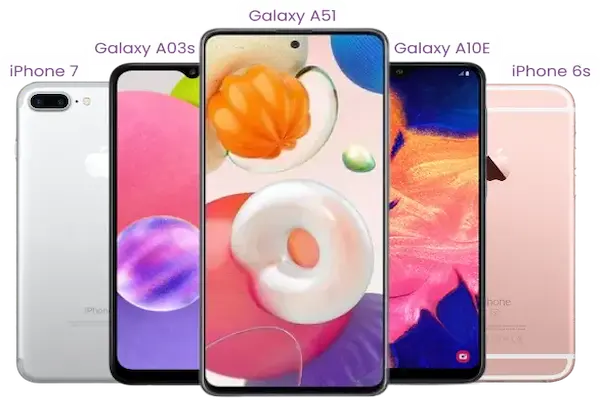
What Kind of Smartphone Can You Expect?
One of the most common questions is what kind of phone a person may receive through a Lifeline offer.
The answer depends on the participating company, your location, and current inventory.
Most companies that include a device tend to offer basic smartphones designed for everyday needs such as calls, texts, email, messaging apps, and internet access.
The included phone may not be a new flagship model, and no single model should be assumed or promised in advance unless the provider confirms it directly.
Some companies may also let you bring your own compatible phone instead of receiving a device from them.
How to Keep Your Lifeline Benefit Active
Once you are enrolled, there are ongoing rules that matter.
You should use your Lifeline service regularly, because a benefit can be turned off if the service is not used.
You also need to respond to annual recertification if USAC or your state asks you to confirm that you still qualify.
If you are asked to recertify, you generally have 60 days to respond or you can lose the benefit.
You should also keep your information accurate and updated if your household eligibility changes.
Official recertification page: Recertify your Lifeline benefit.
Common Myths About a “Free Government Smartphone”
Myth: the government directly hands out phones.
Reality: Lifeline is a federal service discount, while any included device is usually offered by a participating company.
Myth: every eligible person automatically gets a free smartphone.
Reality: you must qualify for Lifeline and then enroll with a company that offers a device in your area.
Myth: any page promising a government phone is trustworthy.
Reality: you should verify eligibility, documents, and participating companies through official Lifeline resources before sharing personal information.
Is a Smartphone with Lifeline Worth It?
For many households, affordable communication is not a luxury.
It can help with job opportunities, health care coordination, school communication, family support, benefit management, and emergency contact.
Even when a plan is basic or the phone is modest, the ability to reduce a recurring bill and stay connected can still make a meaningful difference.
If you think your household may qualify, the safest next step is simple.
- Review the official eligibility rules.
- Gather your documents.
- Apply through the official Lifeline qualification process.
- Use the official tool to compare participating companies in your area.
- Confirm service details directly with the company before enrolling.
That path is more transparent, more accurate, and more aligned with how Lifeline officially works today.
Final notice: this article is independent and does not have any affiliation, sponsorship, endorsement, or control from the FCC, USAC, mobile carriers, device manufacturers, or any other third party mentioned.
Always check current rules and provider details directly through official government-linked Lifeline resources and with the participating company you choose before signing up.